
Fee Waivers
Posted Date: 09/04/26 (04:00 PM)
Hello Families, it has come to our attention that the online application for free and reduced lunches did not have a fee waiver agreement built into the application. The process is very easy to agree to the instructional fee waiver in Pay Schools Central.
1. Log in to your account
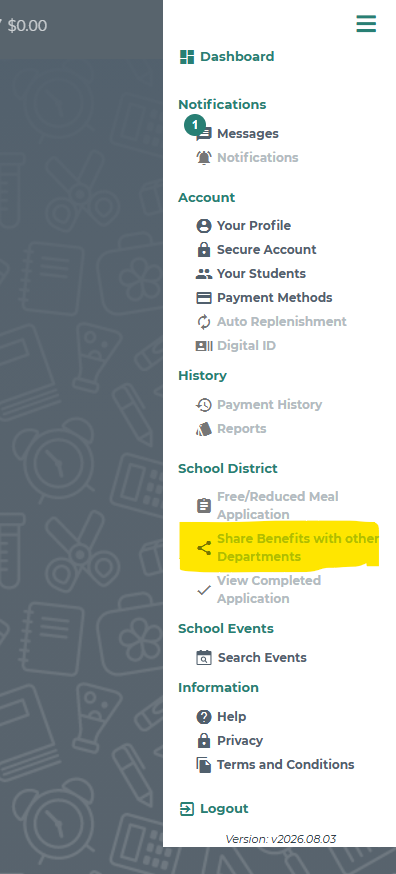
2. When you are on the dashboard page, click on the three lines at the top right corner of the screen next to the shopping cart icon.
3. Under the School District category, click on Share Benefits with other Departments. Once you are in that, you will be able to agree to the fee waiver. (photo attached for reference)
We apologize for the confusion during this process. Future online applications have this feature built in so you will not have to do this every year.
If you have any questions on the process or any other questions related to free and reduced meals, please contact our Nutrition Supervisor, Rechelle Bischoff, at 419-599-2085 or rechelle.bischoff@napoleonareaschools.org